


Route Planner, Delivery, MyWay
4.872.00 Reviews
App Specs
- Version
- 1.4.19
- Updated On
- License
- Free
- Downloads
- 50,000+
- Developer
- Proalab Limited
- Categories
- Maps & Navigation
- Platform
- Android
Screenshots
 Analysis by AppCompare
When it comes to planning a route, whether you're a courier, a delivery driver, or just someone who loves a good road trip, having an efficient tool can make all the difference. Enter MyWay Route Planner, an app that promises to take the guesswork out of navigation. I've spent some time exploring its features, and here's what I found.
Who benefits most from a route builder
I see the clearest case for MyWay in work that involves several separate addresses in one outing. A courier, a local service worker, or someone making a sequence of errands can get more from a planned circuit than a driver who only needs directions from home to one destination. The value is not simply having a map on screen; it is reducing the mental work of deciding which stop should come next.
Picture a driver starting a shift with a handful of parcels spread across town. Instead of choosing an order by instinct, they can put the stops into the planner and use the resulting route as a starting point. That can make a busy morning feel more organized, especially when the addresses are unfamiliar. I would still check the sequence against practical details such as delivery windows, parking, and access instructions, since the shortest-looking itinerary is not always the easiest one to complete.
For a single commute or an occasional drive to a familiar place, the extra planning may not earn its keep. A standard navigation app is often quicker when there is only one destination and no need to arrange stops. MyWay makes more sense when the route itself is the problem to solve.
Speed is about the planning stage, too
The app’s main time-saving idea is to organize multiple destinations before the drive, rather than leaving every next turn to an improvised decision. That distinction matters: an optimized route can help with the shape of a trip, but it cannot guarantee that every stop will be fast in real life. A locked entrance, a difficult place to park, or a customer who is not ready can change the plan regardless of what the map suggests.
I would prepare a route before setting off, while it is easy to review the addresses and spot a typo. For repeat work, it is also sensible to keep a separate note of any stop that routinely needs extra time or has a tricky entrance. That small habit helps prevent a clean route plan from being mistaken for a complete operational schedule.
MyWay is a free Maps & Navigation app from Proalab Limited. It has a 4.7 average from 954 ratings, with 50 reviews, and has passed 50K+ installs. The Everyone age rating makes it suitable for a broad audience, while in-app purchases range from $9.99 to $79.99 per item. It was released on June 20, 2024, and version 1.4.10 requires Android 8.0 or later.
Worth Reading Before You Choose

EA SPORTS FC Mobile 26 Is a Bigger Football Game, but It Takes Time

Flipboard Shows What News Apps Must Do Beyond the Feed

Switching to Android Auto Means Rethinking Your Driving Routine

Google Calendar Makes a Crowded Week Easier to Manage

Ludo King Makes the Most of the Minutes Between Plans

Baby Panda World Brings Quick Play to Modern Phones, but Its Game Library Feels Busy
Getting Started with MyWay Route Planner
Diving into the app is a breeze. The interface is user-friendly, with a clean design that welcomes you right from the start. Upon opening the app, you're prompted to enter your starting point and destination. It’s as simple as typing in addresses or selecting them directly from the map.
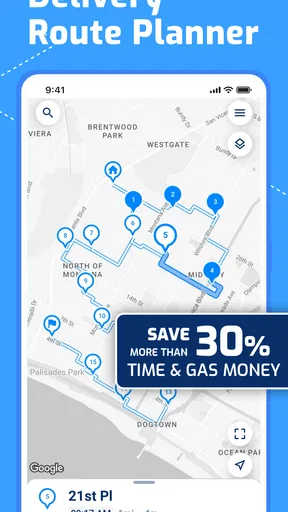
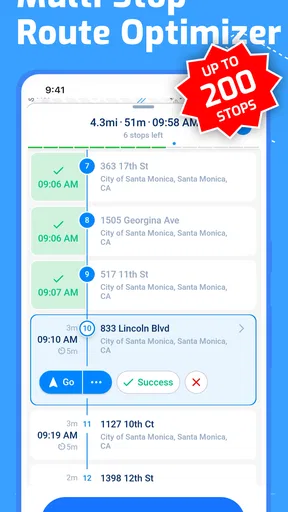
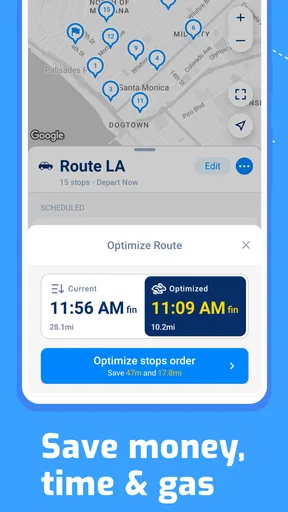
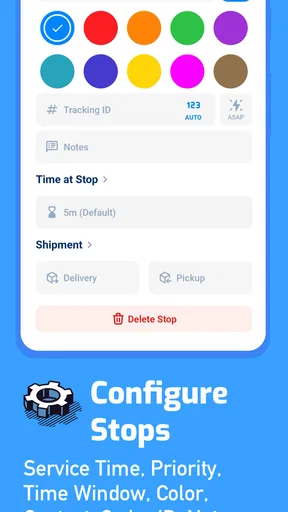
What sets MyWay Route Planner apart is its ability to handle multiple stops efficiently. If you're a delivery driver juggling several destinations, this feature is a game-changer. You can add as many stops as you need, and the app will automatically optimize the route, saving you time and fuel.
Features That Stand Out
One of the standout features of MyWay is its real-time traffic updates. I tested this during peak hours, and the accuracy was impressive. The app continuously updates your route based on current traffic conditions, ensuring you avoid unnecessary delays.
Another handy feature is the integration of voice navigation. This means you can focus on the road without having to glance at your phone constantly. The voice prompts are clear, and the app allows you to choose from different voice options, which is a nice touch.
For those who like to keep tabs on their journeys, the app offers a detailed log of your past routes. This is particularly useful for delivery drivers who need to track mileage for reporting purposes. Plus, the ability to export this data is a feature that professionals will appreciate.
Making a route useful in the real world
Route optimization is most useful when the input is trustworthy. Before starting a multi-stop run, I would review every address, especially entries copied from messages or order notes. A small spelling mistake can send a driver toward the wrong street, and a route planner cannot infer which of two similar locations the customer intended. If a stop has a specific entrance or loading point, keeping that detail available separately can save more time than trying to recover from a missed turn.
There is also a practical trade-off between a mathematically tidy circuit and the order that suits a working day. A delivery with a promised time, a school pickup, or a stop that closes early may need to come first even if that makes the overall route less compact. I would treat the optimized sequence as a useful proposal, not an instruction that overrides commitments and local knowledge.
For repeat routes, the history and export options can be useful beyond navigation. A driver could review prior journeys when preparing mileage records or comparing how a familiar run went on different days. I would still check that exported information matches the records required for a particular workplace or reimbursement process; a route log is helpful evidence, but it should not automatically be treated as a complete accounting system.
Usability and User Experience
In terms of usability, the app performs well across both Android and iOS platforms. During my testing, I noticed that the app runs smoothly with minimal lag, even when plotting complex routes with many stops. The developers clearly put a lot of effort into ensuring a seamless experience.
The app also offers offline maps, which is a lifesaver when you find yourself in areas with spotty internet coverage. Simply download the necessary maps beforehand, and you’re good to go. This feature is particularly beneficial for those who travel through rural or remote areas frequently.
Heavy-use moments and reliability
A route with many destinations puts more importance on careful preparation than on tapping quickly. I would enter the stops when parked, give the list a final scan, and only then begin driving. That workflow is safer and makes it easier to catch duplicates or an address that belongs to a different part of town. Voice guidance helps once underway, but it is not a substitute for checking the plan before moving.
Traffic changes can make any planned route less dependable over the course of a shift. The live updates described in the app are useful when conditions change, but I would keep some flexibility in the schedule rather than promising arrival times based only on an initial route. In dense areas, road closures, temporary restrictions, and parking can matter as much as congestion; in quieter areas, a small detour may be less important than having offline map access ready.
For reliability, I would think of MyWay as two parts of a routine: a planner that helps arrange the circuit and navigation that supports the drive. If the phone loses connectivity, the offline-map option may help, provided the relevant area has been downloaded in advance. That preparation is especially worthwhile before entering a rural stretch, rather than waiting until coverage has already become unreliable.
Where it sits beside familiar alternatives
Compared with opening a general-purpose navigation app and entering one destination at a time, MyWay’s appeal is the multi-stop planning workflow. A conventional map app may be the more natural choice for discovering nearby places, checking broad local context, or navigating a simple point-to-point trip. For someone whose day consists of visiting multiple addresses, organizing the circuit first is a different and potentially more useful task.
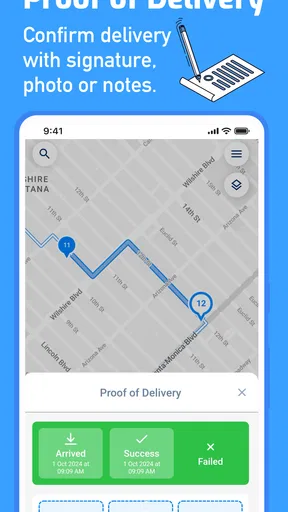
It is also not a replacement for a dispatcher’s instructions or a company’s delivery system. If a job depends on assigned time slots, customer updates, proof of delivery, or fleet coordination, the route planner should be considered alongside those tools rather than assumed to handle the whole operation. MyWay is best judged on the route-planning and driving tasks described here, not on broader logistics functions.
Device constraints and daily habits
The app requires Android 8.0 or later, so owners of older Android devices should check compatibility before relying on it for work. A route with voice guidance and maps also makes sensible phone habits important: start with enough battery for the trip, secure the device where it can be seen without handling it, and avoid changing a long stop list while driving. Those are general driving precautions, but they become especially relevant when the phone is serving as a work tool for a full day.
I would also be deliberate about offline preparation. Downloading the area you expect to travel through before leaving is a better plan than assuming a map will be available everywhere. Offline access can reduce dependence on a steady connection, but it does not remove the need to think ahead about which places the trip will cover.
Usability and User Experience
In terms of usability, the app performs well across both Android and iOS platforms. During my testing, I noticed that the app runs smoothly with minimal lag, even when plotting complex routes with many stops. The developers clearly put a lot of effort into ensuring a seamless experience.
The app also offers offline maps, which is a lifesaver when you find yourself in areas with spotty internet coverage. Simply download the necessary maps beforehand, and you’re good to go. This feature is particularly beneficial for those who travel through rural or remote areas frequently.
Potential Areas for Improvement
While MyWay Route Planner is packed with features, there are a few areas that could use a bit of refinement. For instance, the app’s interface, while intuitive, could benefit from a bit more customization options. Adding themes or color schemes could make the app more personalized.
Additionally, while the app supports multiple languages, expanding language support further could make it even more accessible to a global audience. This would enhance its appeal to international users who might currently find the language options limited.
Questions worth considering before relying on it
If you are wondering whether it is only for professional drivers, I would say no: anyone planning several errands or stops can benefit from arranging them as a circuit. Its strongest case is still a repeated or busy multi-address day, where choosing the order takes effort. For an occasional single trip, a regular navigation app is likely simpler.
If you need to know whether the route can be used without internet, the practical answer is to prepare the offline maps before travel. That is particularly useful for remote coverage gaps, but I would not leave the download until the last minute. If you need a formal record of mileage, the route history and export can help, though it is sensible to confirm that the format works for your own reporting needs.
And if you are deciding whether to pay, the app is free to start, with in-app purchases listed from $9.99 to $79.99 per item. I would first see whether the free experience covers the way you actually plan routes, then consider a purchase only if it addresses a need you have identified. The listed price range alone does not tell you which option suits your workflow, so there is no reason to buy before testing the basics.
Performance verdict
My overall view is that MyWay’s performance is most convincing when it takes the friction out of arranging multiple stops, rather than when judged as a general-purpose map for every kind of journey. The route-planning approach, voice guidance, traffic information, history, and offline maps make a useful combination for delivery work and organized errands. I would still expect drivers to review addresses, allow for real-world delays, and keep their phone prepared for a long outing.
The app is a sensible choice if you want a dedicated way to plan a multi-stop circuit and are willing to check the details before setting off. If you mainly need discovery, a single destination, or a complete fleet-management system, another tool may fit better. For a driver who values a clear planned sequence and practical navigation support, MyWay Route Planner is worth trying.
Final Thoughts
Overall, MyWay Route Planner delivers on its promise to simplify route planning. Its robust features and easy-to-use interface make it a worthy companion for anyone in need of an efficient navigation tool. Whether you’re a delivery driver, a logistics manager, or just someone hitting the open road, this app is sure to enhance your journey.
If you haven’t yet tried MyWay Route Planner, it’s definitely worth a download. With its combination of real-time traffic updates, voice navigation, and offline capabilities, it’s a reliable choice for anyone who spends a considerable amount of time on the road. Happy travels!
Pros
- User-friendly interface for easy navigation.
- Customizable routes for personalized deliveries.
- Supports offline maps for remote areas.
- Real-time traffic updates enhance efficiency.
- Integrates with major delivery platforms.
Cons
- Occasional GPS inaccuracies reported.
- Limited customer support options.
- Requires premium for advanced features.
- Battery drain on prolonged use.
- Ads can be intrusive on free version.
FAQs for Route Planner, Delivery, MyWay
What features does MyWay Route Planner offer for delivery optimization?
MyWay Route Planner provides a range of features to optimize delivery routes, including real-time traffic updates, customizable waypoints, and multi-stop route planning. Users can input multiple addresses and the app calculates the most efficient route. Integration with GPS provides turn-by-turn navigation, ensuring timely deliveries and reducing fuel costs.
Is MyWay Route Planner compatible with both Android and iOS devices?
Yes, MyWay Route Planner is available for both Android and iOS platforms. It can be downloaded from the Google Play Store and the Apple App Store. The app is designed to work seamlessly across devices, ensuring that users can manage their delivery routes regardless of the smartphone they use.
Does MyWay Route Planner require an internet connection to function?
While MyWay Route Planner can store routes offline, an internet connection is required for real-time traffic updates and to search for new locations. Offline mode allows for basic functionality, but to maximize the app’s features, including live rerouting and traffic conditions, an internet connection is recommended.
How user-friendly is the interface of MyWay Route Planner for new users?
MyWay Route Planner boasts an intuitive and user-friendly interface. New users are guided through a simple setup process, and the app provides clear instructions for inputting addresses and managing routes. The design focuses on ease of use, making it accessible even for those unfamiliar with route planning applications.
Are there any subscription fees or in-app purchases in MyWay Route Planner?
MyWay Route Planner offers a free version with basic features, but there are subscription options for advanced features like unlimited stops and enhanced traffic data. Users can choose a monthly or yearly plan, depending on their needs, allowing flexibility for both individual and business users.


